To forward iPhone SMS to Mattermost: (1) Ensure Incoming Webhooks are enabled in Mattermost System Console. (2) In the target channel, open Integrations → Incoming Webhooks → Add Incoming Webhook → copy URL. (3) In Re:Text, tap "+" and select Mattermost, paste URL, test, save. Total time: about 5 minutes.
Mattermost is the go-to team chat for organizations that need self-hosting, GDPR compliance, or full data sovereignty. It's popular with regulated industries, defense contractors, government agencies, and privacy-conscious tech companies.
Why forward SMS to Mattermost?
🔒 Full data sovereignty
Self-hosted Mattermost keeps SMS data on your own servers. Nothing goes to third-party cloud providers.
🇪🇺 GDPR compliance
Deploy in EU-based infrastructure with your own data controls to meet European privacy regulations.
🏛️ Regulated industries
Healthcare, finance, government — where SaaS chat tools face audit and compliance challenges.
🛡️ Air-gapped environments
Route SMS to Mattermost servers in isolated networks (with a public gateway).
What you'll need
- iPhone with iOS 15+
- Re:Text SMS Forwarder installed
- Mattermost server (self-hosted or Mattermost Cloud)
- Mattermost admin access to enable Incoming Webhooks (if not already enabled)
- ~5 minutes
Step 1: Enable Incoming Webhooks in Mattermost
By default, Mattermost webhooks may be disabled. If you're a server admin:
- Go to System Console → Integrations → Integration Management.
- Set Enable Incoming Webhooks to true.
- Optionally enable Integrations can override username / profile picture for cleaner display.
- Click Save.
If you're not an admin, ask your Mattermost administrator to enable webhooks.
Step 2: Create an Incoming Webhook
- Open Mattermost and navigate to the target team.
- Click the main menu (top-left, near team name) → Integrations.
- Click Incoming Webhooks → Add Incoming Webhook.
- Fill in:
- Title — e.g. "iPhone SMS"
- Description — optional, e.g. "SMS forwarded from iPhone via Re:Text"
- Channel — pick the target channel
- Click Save.
- Copy the Webhook URL Mattermost provides.
Step 3: Add Mattermost as a destination in Re:Text
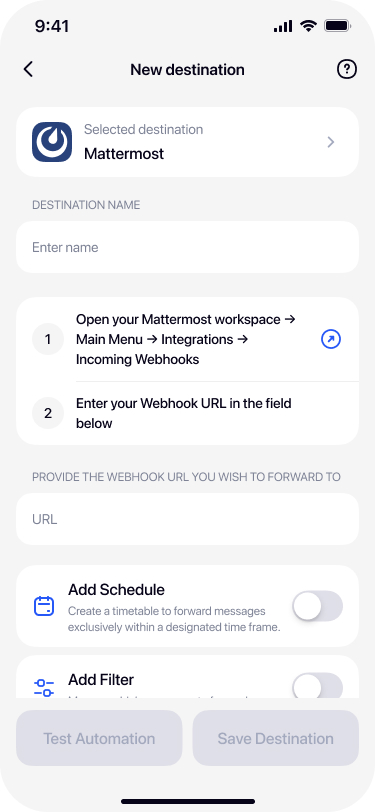
Select Mattermost from destinations
Open Re:Text on your iPhone. Tap + and select Mattermost.

Name your destination
Give it a name — for example Ops Channel, Team Chat, or your server hostname.

Paste the Mattermost webhook URL
Paste the URL from Mattermost into the Webhook URL field.
Test and save
Tap Test Automation — a test message should appear in your Mattermost channel within seconds. Confirm and tap Save Destination.

Mattermost vs Slack for SMS forwarding
Both use similar Incoming Webhook patterns, but they serve different needs:
- Mattermost — Best for self-hosting, GDPR compliance, air-gapped setups, and organizations with strict data-sovereignty needs.
- Slack — Best for teams already using Slack, faster setup, more third-party integrations.
Both work equally well as SMS destinations from Re:Text.
Troubleshooting
Webhooks disabled — 400 error
Ask your Mattermost admin to enable Incoming Webhooks in System Console → Integrations.
Connection timeout
Your Mattermost server may not be reachable from the public internet. Check firewall rules, DNS, and SSL/TLS configuration.
SSL certificate errors
Re:Text requires valid HTTPS. Self-signed certificates aren't supported. Use Let's Encrypt or a proper CA-signed certificate.
Webhook posts to wrong channel
Mattermost webhooks are bound to a specific channel at creation. To change channels, either recreate the webhook or use webhook's optional channel override in the payload.
Frequently asked questions
Does this work with self-hosted Mattermost?+
Yes. Re:Text works with any Mattermost server — self-hosted on your own infrastructure, private cloud, or the official Mattermost Cloud.
Is Mattermost GDPR compliant?+
Mattermost can be deployed in a GDPR-compliant way when self-hosted on infrastructure you control. This is a common reason organizations pick Mattermost over Slack for SMS forwarding.
Does my Mattermost server need to be publicly accessible?+
Yes. Re:Text sends webhook requests from your iPhone over the internet — the webhook URL must be reachable from the public internet. For internal-only Mattermost servers, use a public gateway or VPN.
Does this work with Mattermost Focalboard or Playbooks?+
Re:Text posts to Mattermost channels via Incoming Webhooks. From there, you can hook up Playbooks or other Mattermost features to react to forwarded SMS.
Can I forward to multiple Mattermost servers?+
Yes with Re:Text Premium. Set up multiple Mattermost destinations, each with webhook URLs from different servers or channels.
Are there rate limits?+
Mattermost limits depend on your server configuration. Default is quite generous — typically hundreds of messages per minute. Check your System Console for custom rate limit settings.
Route iPhone SMS to Mattermost.
Free forever with 1 destination. Perfect for self-hosted and compliance-focused teams.
Download on the App Store