To forward iPhone SMS to Slack: (1) In Slack, install the Incoming Webhooks app, choose a channel, and copy the webhook URL. (2) In Re:Text, tap "+" and select Slack, paste the URL, name the destination, and save. Total time: about 5 minutes. Once configured, SMS forward automatically to your Slack channel.
Forwarding SMS to Slack is one of the most powerful team workflows. Instead of one person's iPhone hoarding customer messages, delivery notifications, or on-call alerts — those messages can appear in a shared Slack channel your whole team monitors.
Why forward SMS to Slack?
👥 Customer SMS in a #sales channel
Route incoming customer texts to your sales team's channel so nothing is missed.
🚨 On-call alerts to #ops-alerts
Critical infrastructure SMS reach the on-call engineer plus the whole ops team simultaneously.
🔐 Shared 2FA codes
Codes for shared team accounts (analytics, ad platforms, tools) become accessible to everyone with channel access.
📦 Delivery notifications
Track shipments and delivery SMS in a #logistics channel visible to operations staff.
What you'll need
- iPhone with iOS 15+
- Re:Text SMS Forwarder installed
- Slack workspace with permission to install apps (usually admin/owner)
- Target channel to receive SMS
- ~5 minutes
Step 1: Create a Slack Incoming Webhook
Slack Incoming Webhooks are the standard way to post messages into a channel from outside services. Setup takes 2 minutes:
- Open Slack in your browser and go to slack.com/apps/A0F7XDUAZ (the Incoming Webhooks app) or search "Incoming Webhooks" in your workspace's App Directory.
- Click Add to Slack.
- Choose the channel where SMS should be posted (public, private, or your own DM).
- Click Add Incoming WebHooks integration.
- Copy the Webhook URL Slack generates. It looks like:
https://hooks.slack.com/services/T0/B0/XXXXXXXX - Optionally customize the display name, icon, and channel override.
Step 2: Add Slack as a destination in Re:Text
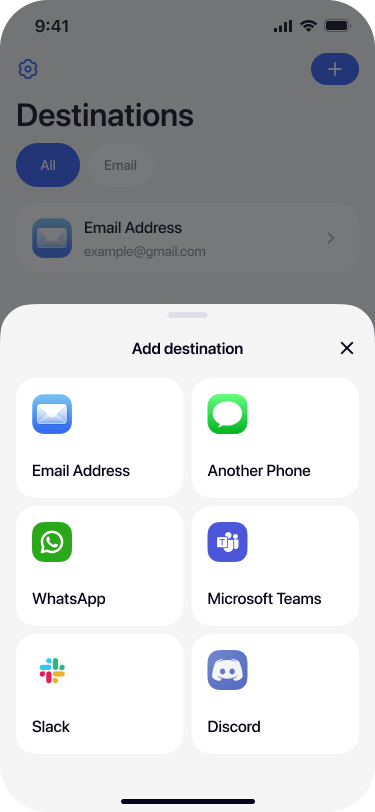
Select Slack from destinations
Open Re:Text on your iPhone. Tap + on the Destinations screen and select Slack.
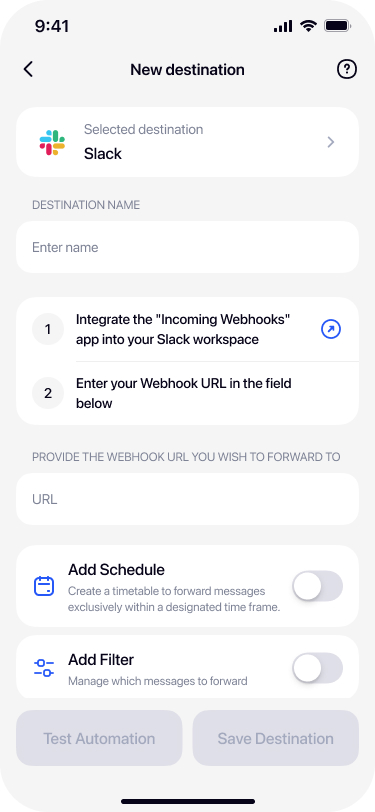
Name your destination
Give it a name that describes the target channel — for example #alerts channel, Sales Team, or DevOps Ops.

Paste the Slack webhook URL
Paste the webhook URL you copied from Slack into the Webhook URL field.
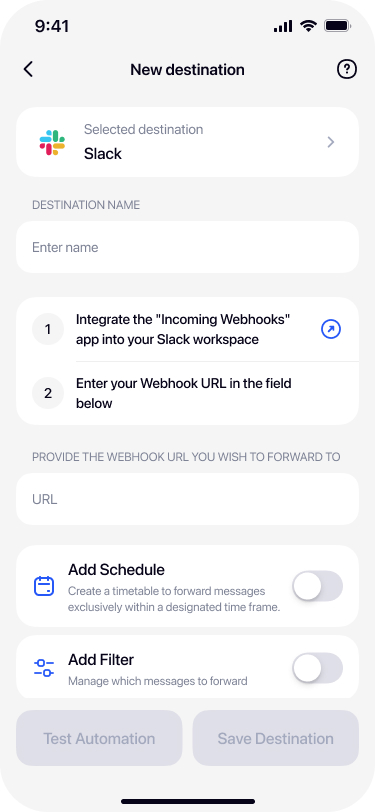
Test and save
Tap Test Automation — a test message should appear in your Slack channel within seconds. Once confirmed, tap Save Destination.
Advanced: filters for Slack forwarding
Forwarding everything to Slack will quickly get noisy. Use filters to route only what matters:
- Route customer SMS to #sales — filter by sender phone number to only forward messages from customers.
- Route 2FA codes to a private channel — filter by keywords (
code,OTP) and send to a channel only trusted team members access. - Only during business hours — enable Schedule to prevent 3am notifications.
- Route different SMS types to different channels — set up multiple Slack destinations, each with different webhook URLs and filters.
Troubleshooting
Webhook returns 404 or "no_service"
The webhook was deleted or the workspace was renamed. Regenerate the webhook in Slack and update Re:Text.
Messages appear in the wrong channel
Slack webhooks are bound to a specific channel at creation. To change channels, either recreate the webhook or (if allowed) override the channel in the webhook payload.
Rate limits — messages missing
Slack limits Incoming Webhooks to about 1 message per second per webhook. High-volume SMS may hit limits. Reduce with keyword filters or use multiple webhooks.
Formatting issues
Slack supports basic markdown in webhook messages. Special characters in SMS content are usually rendered fine, but URLs may auto-link and asterisks may bold text.
Frequently asked questions
Can I forward SMS to a Slack DM?+
Slack Incoming Webhooks post to channels only, not DMs. To send to yourself privately, create a private channel with only you as a member and forward there.
How many SMS can I forward to Slack per second?+
Slack limits Incoming Webhooks to about 1 message per second per webhook. For higher volumes, use multiple webhooks or filters to reduce SMS forwarding rate.
Is my SMS content stored in Slack?+
Yes. Once forwarded to a Slack channel, the SMS content is stored in Slack's servers under Slack's own data retention policies. Consider this before forwarding sensitive SMS.
Does this work with Slack Enterprise Grid?+
Yes. Slack Enterprise Grid supports Incoming Webhooks like standard Slack. Follow your organization's approval process for adding apps.
Can I forward to multiple Slack channels?+
Yes with Re:Text Premium. Set up multiple Slack destinations, each with a different webhook URL pointing to different channels.
Can I customize how forwarded SMS appear in Slack?+
The webhook configuration in Slack (icon, username, default channel) determines how messages appear. Modify these settings in your Slack workspace's app configuration.
Route iPhone SMS to your Slack team.
Free forever with 1 destination. Premium unlocks unlimited channels.
Download on the App Store