Re:Text can forward iPhone SMS to any HTTP endpoint with full control over method (POST/GET/PUT), headers, and JSON body. This makes it the most flexible SMS forwarding tool on iOS — perfect for Telegram Bot API, Pushover, Zapier, Make, n8n, Home Assistant, or your own server. Setup takes about 5 minutes for most integrations.
Most SMS forwarding apps offer a limited "webhook URL" field that fires a fixed JSON payload — take it or leave it. That's fine for basic integrations, but it doesn't work when your API needs an Authorization header, a specific body structure, or a non-POST method.
Re:Text takes a different approach. When you add a Webhook destination, you get:
- Full HTTP method choice — POST, GET, or PUT
- Unlimited custom headers — Authorization, Content-Type, API keys, User-Agent, anything
- Configurable body key — decide what JSON field holds the SMS content (
text,message,content, or anything else) - Static body fields — send extra JSON fields on every request (like
chat_idfor Telegram ortokenfor Pushover)
Effectively, Re:Text turns your iPhone SMS stream into a fully-configurable HTTP request generator. If your target service accepts REST calls, you can forward SMS to it.
How Re:Text's webhook compares to other SMS forwarders
| Feature | Re:Text Webhook | Typical SMS forwarder webhook |
|---|---|---|
| HTTP method choice | POST / GET / PUT | POST only |
| Custom headers | Unlimited | None |
| Bearer token / API key auth | ✓ | ✗ |
| Custom JSON body key | ✓ (any field name) | Fixed schema |
| Static body fields | ✓ | ✗ |
| Direct Telegram Bot API | ✓ (no Zapier needed) | Requires middleman |
| Direct Pushover integration | ✓ | ✗ |
| Test before enable | Built-in | Rarely |
What you'll need
- An iPhone (iOS 15 or later)
- The Re:Text SMS Forwarder app
- A webhook endpoint — your own server, Zapier catch hook, Home Assistant, or a public API like Telegram Bot / Pushover
- Any authentication credentials (tokens, keys) your endpoint requires
- ~5 minutes
Understanding the webhook fields
Before diving into setup, it helps to understand the four main fields Re:Text exposes:
URL
The endpoint you're POSTing to. Must be HTTPS for production integrations. Examples:
https://api.telegram.org/bot123456789:ABC-DEF/sendMessagehttps://api.pushover.net/1/messages.jsonhttps://hooks.zapier.com/hooks/catch/1234567/abcdef/https://your-server.com/sms-webhook
Method
Choose POST, GET, or PUT. Most APIs use POST for creating resources (like sending a message). GET is rarely needed — but Re:Text supports it for services that expect query parameters.
Body Key
The JSON field name that will hold the SMS content. For example:
- Telegram Bot API →
text - Pushover →
message - Discord webhook →
content - Slack webhook →
text - Your custom API → whatever you named it
Headers
Any HTTP headers your endpoint requires. Common ones:
Content-Type: application/jsonAuthorization: Bearer YOUR_API_TOKENAuthorization: Basic BASE64_CREDENTIALSX-API-Key: YOUR_KEY
Body Fields
Static JSON fields sent with every request, in addition to the SMS content. Examples:
- Telegram:
chat_id=1001234567890 - Pushover:
token=YOUR_APP_TOKEN,user=YOUR_USER_KEY - Custom:
source=iphone-sms,env=production
Step-by-step: set up a webhook destination
Add Webhook as a destination
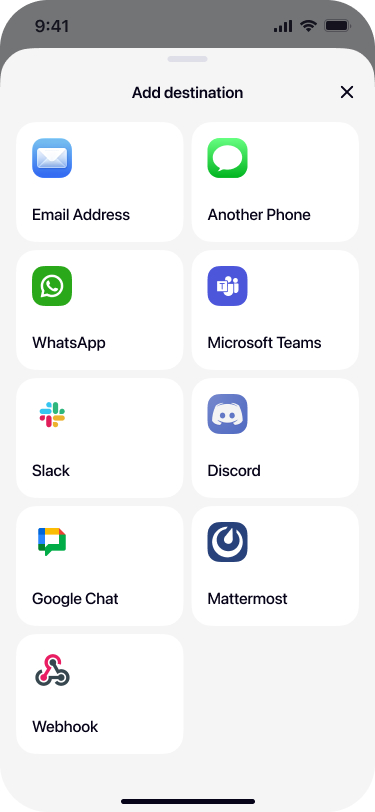
Open Re:Text. Tap + on the Destinations screen. Scroll down in the bottom sheet and tap Webhook.
Enter your webhook URL
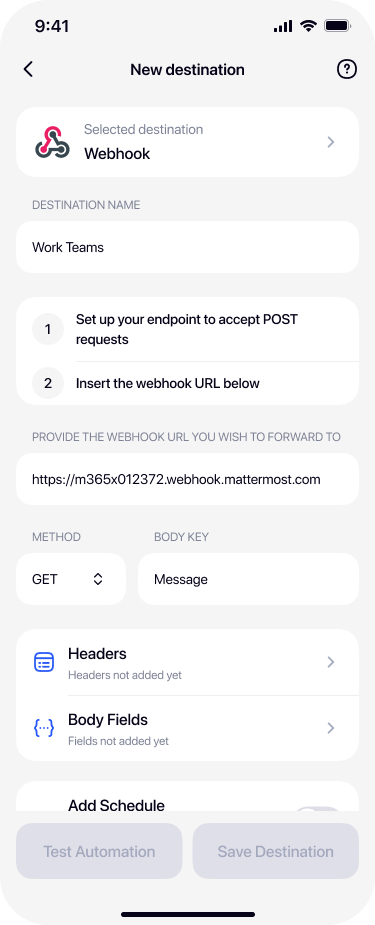
Paste the URL your endpoint expects. Give the destination a name that describes its purpose (e.g. "Telegram Bot", "Zapier Sync", "Home Assistant").
Choose HTTP method and body key
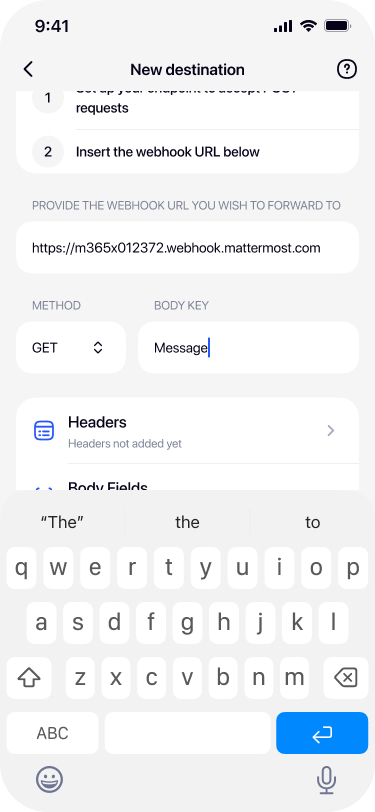
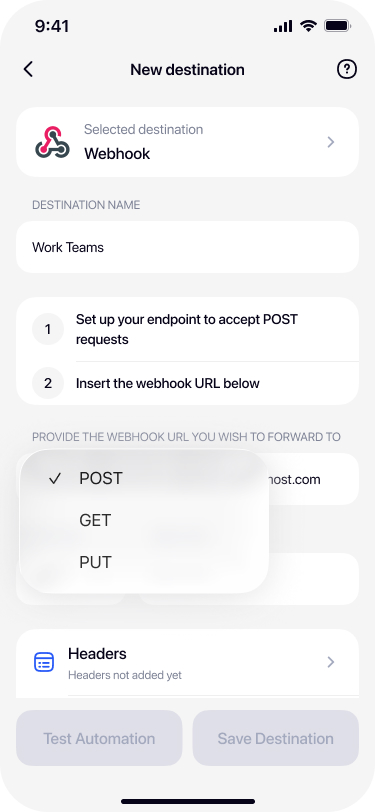
Tap the Method dropdown and pick POST (most common), GET, or PUT. Then set the Body Key — the JSON field name that will hold the SMS content.
Add custom headers
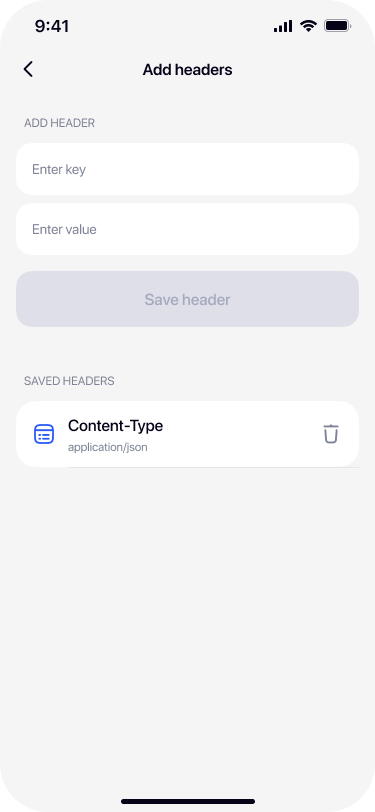
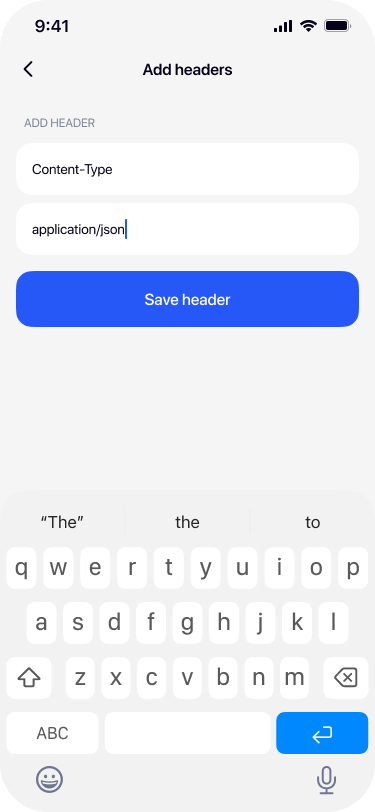
Tap Headers to open the header editor. Add a Content-Type header (usually application/json), plus any auth headers your API requires.
Add body fields (optional)
If your API needs additional JSON fields beyond the SMS content (like chat_id for Telegram or token for Pushover), tap Body Fields and add them.
Test and save
Tap Test Automation to fire a test payload at your endpoint. Verify it arrives correctly, then tap Save Destination.
Real-world integration examples
Here are ready-to-use configurations for the most popular webhook targets. Copy the values and adapt them to your accounts.
📱 Forward SMS to Telegram Bot API
If you want to forward SMS to a Telegram group, channel, or a different account (not the built-in one-tap Telegram destination), use the Telegram Bot API directly.
Setup: First, create a bot via @BotFather in Telegram, get the bot token, and find your chat_id. Then configure Re:Text:
URL:        https://api.telegram.org/bot<BOT_TOKEN>/sendMessage
Method:     POST
Body Key:   text
Headers:    Content-Type: application/json
Body Fields:
  chat_id:  <YOUR_CHAT_ID>
Replace <BOT_TOKEN> with your bot token from BotFather, and <YOUR_CHAT_ID> with the destination chat ID (positive number for user, negative for group).
💡 Prefer one-tap setup? Re:Text has a built-in Telegram destination that skips BotFather entirely.
🔔 Forward SMS to Pushover
Pushover delivers push notifications to all your devices with rich formatting. Great for critical SMS alerts.
URL:        https://api.pushover.net/1/messages.json
Method:     POST
Body Key:   message
Headers:    Content-Type: application/json
Body Fields:
  token:    <YOUR_APP_TOKEN>
  user:     <YOUR_USER_KEY>
Get your app token by creating an application in Pushover's dashboard. Your user key is on the main dashboard.
⚡ Forward SMS to Zapier
Zapier lets you connect the forwarded SMS to 5,000+ apps — Google Sheets, Notion, Airtable, Salesforce, and more.
Setup: In Zapier, create a Zap with Webhooks by Zapier → Catch Hook trigger. Copy the webhook URL Zapier generates.
URL:        https://hooks.zapier.com/hooks/catch/1234567/abcdef/
Method:     POST
Body Key:   message
Headers:    Content-Type: application/json
Add whatever downstream action you want in Zapier — log to Google Sheets, save to Notion, send to Slack, or trigger any of 5,000+ apps.
🔧 Forward SMS to Make (Integromat)
Similar to Zapier but with more visual workflow control.
URL:        https://hook.eu2.make.com/abc123xyz
Method:     POST
Body Key:   text
Headers:    Content-Type: application/json
Create a scenario in Make with the Custom Webhook module as the trigger. Copy the URL it provides.
🏠 Forward SMS to Home Assistant
Trigger automations, log SMS to your database, or announce SMS on your smart speakers when they arrive.
URL:        https://your-home-assistant.local/api/webhook/sms_received
Method:     POST
Body Key:   message
Headers:    Content-Type: application/json
            Authorization: Bearer <LONG_LIVED_TOKEN>
Get a long-lived access token from your Home Assistant user profile. Configure a webhook trigger automation to react to the payload.
🤖 Forward SMS to n8n
Self-hosted workflow automation with unlimited executions.
URL:        https://your-n8n.com/webhook/sms-received
Method:     POST
Body Key:   text
Headers:    Content-Type: application/json
Add a Webhook node in n8n, copy the URL, and build any downstream workflow from there.
🌐 Forward SMS to your own server
Full flexibility — capture SMS in your own backend for custom processing.
Node.js (Express)
const express = require('express');
const app = express();
app.use(express.json());

app.post('/sms-webhook', (req, res) => {
  const { message, sender, timestamp } = req.body;
  console.log(`SMS from ${sender}: ${message}`);
  // Your logic here
  res.status(200).json({ ok: true });
});

app.listen(3000);
Python (Flask)
from flask import Flask, request, jsonify

app = Flask(__name__)

@app.route('/sms-webhook', methods=['POST'])
def sms_webhook():
    data = request.json
    message = data.get('message')
    # Your logic here
    return jsonify({'ok': True}), 200

app.run(port=3000)
📊 Forward SMS to Google Sheets
Log every SMS to a spreadsheet via Google Apps Script.
Create an Apps Script bound to a Sheet with a doPost(e) function. Deploy as a Web App with anonymous access. Use the deployment URL as your webhook.
URL:        https://script.google.com/macros/s/DEPLOYMENT_ID/exec
Method:     POST
Body Key:   message
Headers:    Content-Type: application/json
Advanced: filters and schedules for webhooks
Webhook destinations support the same filters and schedules as every other destination:
- Filter by keyword — only forward SMS containing "CODE", "OTP", "alert", etc.
- Filter by sender — only forward SMS from specific phone numbers or shortcodes
- Schedule — forward only during business hours or specific days
Combine multiple webhook destinations for advanced routing — send SMS from your bank to one endpoint, 2FA codes to another, and delivery notifications to a third.
Security best practices
- Always use HTTPS. HTTP endpoints are unencrypted — anyone on the network can read SMS content.
- Store API tokens in headers, not URLs. URL query strings often end up in server logs.
- Rotate tokens periodically. Especially if you suspect compromise.
- Use IP whitelisting on your endpoint if it supports it.
- Validate payloads on your server — don't trust incoming webhook data blindly.
- Log carefully. Don't log full SMS content in production logs — verification codes could be exposed.
Troubleshooting
401 Unauthorized
Your Authorization header is missing, malformed, or contains an invalid/expired token. Double-check the format (usually Bearer <token>).
400 Bad Request
The JSON body is missing required fields or has wrong types. Check what your API expects and confirm your Body Fields match.
404 Not Found
Wrong URL — double-check the endpoint path. For Telegram Bot API, make sure the bot token in the URL is correct.
429 Too Many Requests
Rate-limited by the destination. Telegram allows about 30 messages/second per bot. Slack: 1/sec per webhook. Adjust filters to reduce forwarding volume.
Timeouts
Your endpoint took too long to respond. Ensure your webhook handler returns 200 quickly — do heavy processing asynchronously after acknowledging the request.
Frequently asked questions
Can I use any REST API as a webhook destination?+
Yes. Re:Text supports POST, GET, and PUT methods with custom headers and JSON body. Any REST API that accepts one of these methods can receive forwarded SMS.
Can I forward SMS to Telegram Bot API through a webhook?+
Yes. Use POST to https://api.telegram.org/bot<TOKEN>/sendMessage, set body key to text, add chat_id as a body field, and Content-Type: application/json as a header. For simple personal use, however, the built-in Telegram destination is much easier.
Does Re:Text support webhook authentication?+
Yes. Add Authorization headers with Bearer tokens, API keys, or Basic auth as custom headers when setting up the webhook destination.
What's the maximum payload size for a webhook?+
SMS content is limited by carrier to about 160 characters per message (or 70 for Unicode). Even with metadata, webhook payloads stay well under 4KB — safe for virtually any endpoint.
Are webhook requests logged by Re:Text?+
No. Re:Text does not log, store, or read webhook payloads or SMS content. Messages are processed on your device and sent directly to your endpoint.
Can I set up multiple webhook destinations?+
Yes. With Premium, you can add unlimited webhook destinations, each with different URLs, methods, headers, filters, and schedules. Perfect for routing different SMS types to different systems.
Does Re:Text support GraphQL webhooks?+
GraphQL over HTTP works — since GraphQL usually accepts POST with JSON body. Set your GraphQL endpoint URL, POST method, and configure the JSON body with your query and variables.
Can I customize the JSON structure sent to the webhook?+
Partially. You can set the Body Key (the field name that holds the SMS content) and add unlimited static Body Fields. Full JSON restructuring isn't supported — for that, use a middleware layer like Zapier or your own proxy server.
Ready to build your first SMS-triggered automation?
Full webhook support in the free tier (1 destination). Premium unlocks unlimited endpoints.
Download on the App Store