To forward iPhone SMS to Discord: (1) In your Discord server, open channel settings → Integrations → Webhooks → New Webhook → copy URL. (2) In Re:Text, tap "+" and select Discord, paste the URL, name it, test, and save. Total time: about 4 minutes.
Discord isn't just for gaming anymore — it's the go-to hub for dev communities, startups, DAOs, hobby groups, and small teams. Forwarding iPhone SMS to a Discord channel is a great way to consolidate notifications from your phone into your community's central chat.
Popular use cases
- Gaming teams — receive tournament notifications and coordination texts in team channel
- Dev communities — route deploy alerts, monitoring SMS, or CI failures to #deploys
- Small startups — customer SMS to #support channel where everyone can see
- Personal server — create a private Discord server just for you and consolidate all iPhone notifications
- Family server — share delivery updates and codes with family members
What you'll need
- iPhone with iOS 15+
- Re:Text SMS Forwarder installed
- A Discord server where you have Manage Webhooks permission
- Target channel
- ~4 minutes
Step 1: Create a Discord webhook
- Open Discord (desktop or web) and navigate to the target server.
- Right-click the channel where SMS should appear → Edit Channel.
- Click Integrations in the sidebar.
- Click Webhooks → New Webhook.
- Rename the webhook (e.g. "iPhone SMS") and optionally upload an avatar.
- Click Copy Webhook URL.
- Click Save Changes.
Step 2: Add Discord as a destination in Re:Text
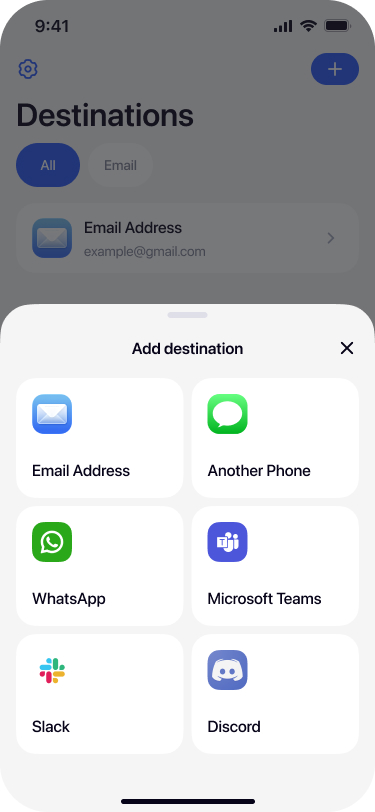
Select Discord from destinations
Open Re:Text on your iPhone. Tap + and select Discord.
Name your destination
Give it a name that describes the server + channel — for example Gaming #alerts or Dev Server #deploys.
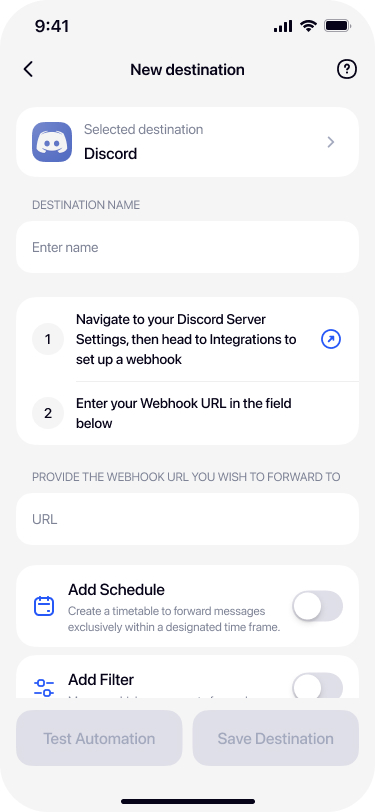
Paste the Discord webhook URL
Paste the URL from Discord into the Webhook URL field.
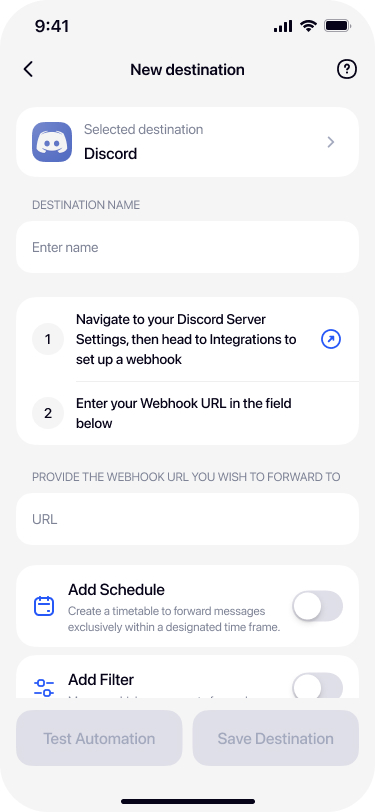
Test and save
Tap Test Automation — a test message should appear in your Discord channel within seconds. Once confirmed, tap Save Destination.
Advanced: filters and multiple channels
Combine Discord destinations with Re:Text filters:
- Route only alerts to #alerts channel — filter by keyword
ALERT,DOWN,ERROR. - Send customer SMS to #support — filter by specific sender phone numbers.
- Ship delivery updates to #logistics — filter by carrier shortcodes.
Set up multiple Discord destinations (Premium) with different webhook URLs pointing to different channels.
Troubleshooting
Webhook returns 401
Webhook was deleted or reset. Regenerate the webhook in Discord and update Re:Text with the new URL.
Rate limits
Discord limits webhooks to about 30 messages per minute per channel. Very high SMS volumes may hit this — use filters to reduce.
Formatting issues
Discord supports full markdown in webhook messages. URLs auto-embed, asterisks bold text, and backticks create code blocks. Usually SMS content displays fine, but be aware of these transformations.
Frequently asked questions
Do I need to be Discord server admin?+
You need the Manage Webhooks permission on the channel. Server owners and users with admin roles have it by default. Others can be granted the permission by the server owner.
Is it safe to share my SMS in a Discord server?+
Only if you fully trust the server members and moderators. Never forward verification codes or sensitive SMS to public Discord servers or servers with untrusted members.
Can I forward SMS to a Discord DM?+
Discord webhooks work with server channels only, not DMs. Create a private server with just yourself to receive SMS privately.
Can I customize the webhook display?+
Yes, in Discord's webhook settings. Set a custom name, avatar, and choose the target channel. These apply to all messages sent via that webhook.
Can I forward to multiple Discord servers?+
Yes with Re:Text Premium. Set up multiple Discord destinations with webhook URLs from different servers or channels.
What if the webhook URL leaks?+
Anyone with the URL could post spam to your channel. In Discord webhook settings, delete the compromised webhook and create a new one. Update Re:Text with the new URL.