To forward iPhone SMS to WhatsApp: install Re:Text, tap "+" and select WhatsApp, enter the WhatsApp number to forward to, then follow the in-app instructions to enable Shortcuts Automation. Setup takes ~3 minutes. Once configured, forwarding is fully automatic — no manual taps needed per message.
WhatsApp is a natural place to receive forwarded iPhone SMS. It's already open on all your devices, has excellent search, notifications work reliably, and it's free forever. Many people use WhatsApp as their personal SMS backup and multi-device sync solution.
This guide shows how to forward iPhone SMS to any WhatsApp number using Re:Text — with fully automatic forwarding, not the tap-to-send approach that other forwarders use.
Why forward SMS to WhatsApp?
- Multi-device access — read forwarded SMS on your phone, tablet, desktop, or web browser.
- Reliable notifications — WhatsApp's push notifications are more consistent than email.
- Powerful search — find any SMS in seconds across years of history.
- Free forever — no ads, no message limits, no attachment caps.
- Share to contacts — forward received codes to family members or colleagues in seconds.
- Backup for lost phones — SMS content survives in WhatsApp cloud.
What you'll need
- iPhone (iOS 15 or later)
- Re:Text SMS Forwarder installed
- A phone number with WhatsApp active (yours or someone else's)
- ~3 minutes
Step-by-step: forward iPhone SMS to WhatsApp
Add WhatsApp as a destination
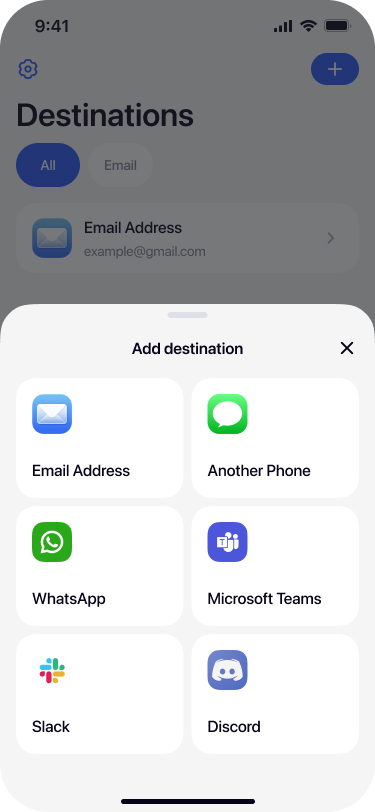
Open Re:Text. Tap + on the Destinations screen. In the bottom sheet, tap WhatsApp.
Name your destination
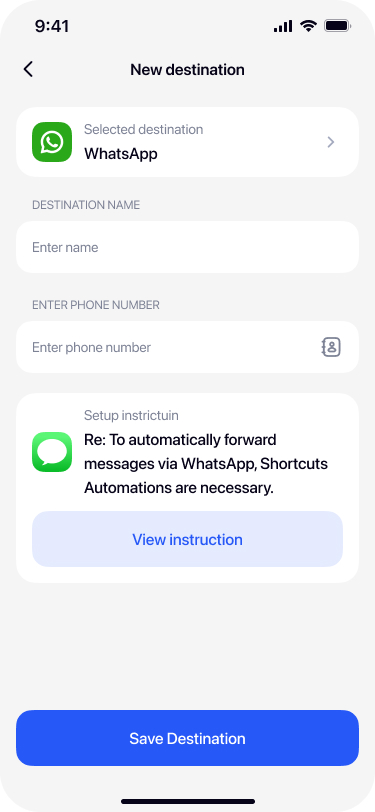
Give the destination a name — for example My WhatsApp, Personal WhatsApp, or the recipient's name if forwarding to someone else.
Enter the WhatsApp phone number
Type the phone number in international format (e.g., +1 555 123 4567). This must be a number with an active WhatsApp account — otherwise messages won't be delivered.
You can also tap the contact icon on the right of the phone field to pick from your Contacts.
Follow the in-app Shortcuts setup
WhatsApp forwarding uses iOS Shortcuts Automation to work automatically. In the destination form, tap View instruction to open the step-by-step guide inside the app.
The guide walks you through creating a Shortcuts Automation that triggers on incoming messages — this is what enables background forwarding without manual taps.
Save and test
After completing the Shortcuts setup, return to Re:Text and tap Save Destination. Ask a friend to text your iPhone — the message should appear in WhatsApp within a few seconds.
Advanced: filters for WhatsApp forwarding
Just like other destinations, WhatsApp forwarding supports filters and schedules:
- Keyword filter — forward only messages containing "code", "OTP", "bank", etc.
- Sender filter — forward only messages from specific numbers (like your bank).
- Schedule — forward only during business hours or specific days.
These filters keep spam SMS off your WhatsApp while ensuring you never miss important messages.
Troubleshooting
Messages aren't arriving in WhatsApp
Check that: (1) the phone number has an active WhatsApp account, (2) the Shortcuts Automation is enabled, (3) the destination is toggled ON in Re:Text, (4) your iPhone has an internet connection.
Shortcuts Automation was disabled
iOS sometimes disables Automations after updates. Open the Shortcuts app → Automation tab → verify the SMS forwarding automation is enabled.
Wrong phone number format
Use international format with country code (e.g. +1 for US, +44 for UK, +91 for India). Numbers without country codes won't work.
Frequently asked questions
Is WhatsApp SMS forwarding automatic?+
Yes. Re:Text forwards SMS to WhatsApp fully automatically — no manual taps required for each message. Once set up, forwarding happens in the background using iOS Shortcuts Automation.
Can I forward SMS to a WhatsApp group?+
The one-tap setup forwards to a specific phone number's WhatsApp chat, not groups. For group forwarding, use the Webhook destination with a custom integration.
Does the recipient need WhatsApp?+
Yes. The destination phone number must have WhatsApp installed and active — otherwise messages can't be delivered.
Can I forward to multiple WhatsApp numbers?+
Yes with Premium. Set up multiple WhatsApp destinations, each pointing to a different phone number with different filters.
Will forwarded SMS trigger WhatsApp notifications?+
Yes, like any WhatsApp message. If you don't want notifications, mute the chat in WhatsApp — messages will still arrive silently.
Does WhatsApp see my SMS content?+
WhatsApp handles delivery of the forwarded message under its own end-to-end encryption. Once delivered, SMS content is stored in WhatsApp's chat history like any other WhatsApp message.
Can I forward SMS to WhatsApp Business?+
Yes. Any phone number with WhatsApp — regular or Business — works as a destination.
Ready to forward SMS to WhatsApp?
Fully automatic — no manual taps. Free forever with 1 destination.
Download on the App Store